Have you ever Googled something? Whether it's a product, a local business, or an answer to a question you had, you've probably just clicked on one of the top few results because they looked like the right ones. If you own a website and you want more people to find your pages in that same way, then SEO (Search Engine Optimization) is the thing you need to get your site found.
SEO helps website owners get their pages to appear higher in the unpaid (organic) search results. It's about producing useful content, structuring the information on your site properly, improving the performance of your site, and helping the search engines to understand what your pages are all about. It's something that anyone can benefit from, whether you're a student getting into digital marketing, a blogger trying to build an audience, or a small business owner looking to get customers. Understanding SEO can help you make better decisions about your online presence.
In this very accessible guide, you'll find out what SEO is, how search engines work, which SEO techniques are important, and how you can go about optimizing your site. You'll also get a look at the tools you'll need, the common mistakes to avoid, and a straightforward 30-day plan to get you started.
What Is SEO?
Search engine optimization (SEO) is the process of improving a website so that search engines can find it, understand it, and present it in the search results when people are looking for relevant information. The objective is to get useful, free (unpaid) traffic from the search results rather than just advertising. It's a mix of content quality, site structure, technical accessibility, and all the signals that search engines use to work out what a page is about and how useful it is.
Think of a search engine as a massive digital library. Each website is made up of pages that can answer different questions, cover different topics, or provide different services. The search engine uses bots to crawl the web, find the pages, assess the content, and then work out which results are relevant to a given search. SEO is all about making your site more understandable and more useful to the people you're trying to reach. Google's own SEO Starter Guide covers all of this and provides practical advice for website owners.
For instance, suppose you run a bakery in Ghaziabad. You have a page detailing your cakes, the prices, the areas you deliver to, and the option of custom orders. You have clear contact information and good photos of your goods. If someone searches for something like "custom birthday cakes Ghaziabad," your page could end up in the results if it's accessible, relevant, and competitive.
SEO doesn't mean stuffing a keyword into every single sentence or guaranteeing you'll come up first on Google. It means helping people find the information they're looking for and making your site easier for search engines to understand.
Organic Search Results vs. Paid Advertisements
Search results can contain both organic listings and paid advertisements. Organic results are those the search engine has deemed relevant to the query. Paid search results are advertisements that have been placed via the advertising platforms.
Feature | Organic SEO | Paid Search Advertising |
Cost | No fee is charged simply for an organic click, although SEO work may cost money. | Advertisers generally pay according to their campaign model. |
Visibility | Earned through relevance and other ranking systems | Depends on advertising settings, bids, eligibility, and competition |
Timeframe | Often requires sustained effort | Ads can begin appearing after a campaign is approved and eligible. |
Duration | Visibility can continue while a page remains competitive. | Visibility usually stops when campaigns pause or budgets are exhausted |
Best use | Building long-term organic discovery | Reaching audiences through paid campaigns and testing offers |
Both of those approaches can be used to support a digital marketing strategy. SEO is particularly useful if you're looking to get people to find your useful pages over time. Paid advertising, on the other hand, can give you much more direct control over your targeting and your spending. The right mix will depend on your objectives, your budget, your competition, and your audience.
How Does SEO Work?
To understand SEO, you have to first understand how search engines actually work with web pages. They don't just go through every website and manually pick the best ones to put at the top. What they do is they have automated systems that crawl the web, parse the content, and then assess which pages are likely to be the best answer to a given search query.
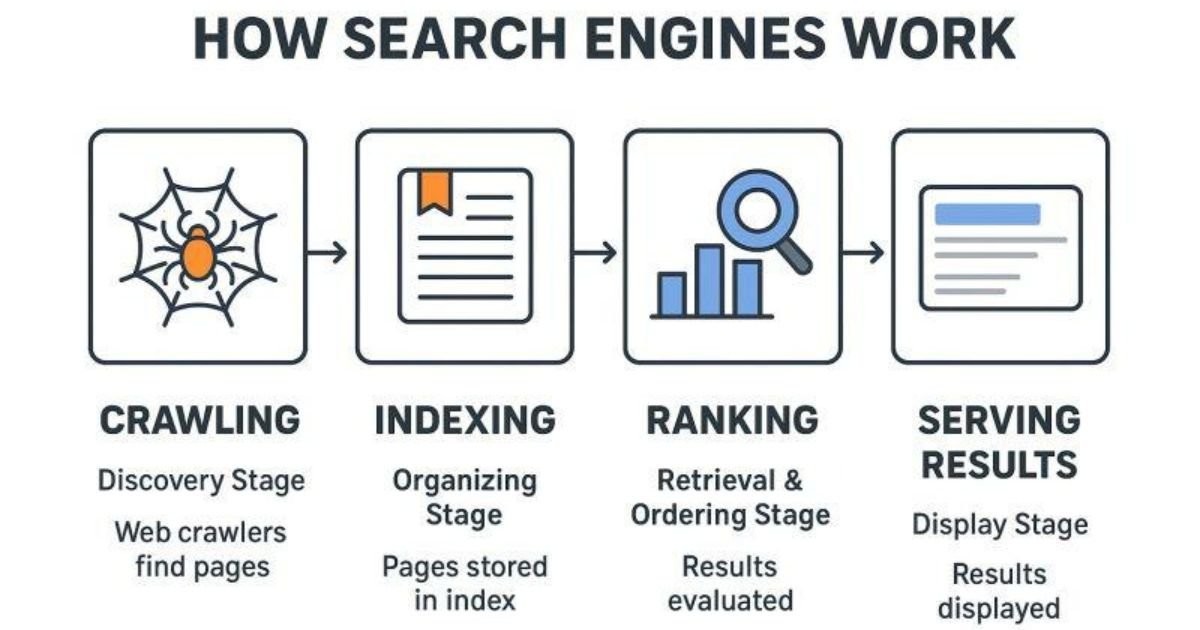
Google's search process is broadly split into three stages: crawling, indexing, and serving of search results. Not all pages go through all three stages, and meeting the technical requirements doesn't necessarily mean that a page will be indexed or served.
Crawling, Indexing, and Search Results
1. Crawling: Discovering pages
Search engines use automated programs (crawlers) to discover URLs and access the content of those pages. They'll find them via links from other pages, via URLs that they already know about, and via sitemaps that you submit. Good navigation and crawlable links will go a long way to helping the search engines find the important bits of your site.
2. Indexing: Understanding and storing content
After finding a page, a search engine will go on to analyze the text, images, links, and any other information it can find. It will then decide whether or not to index the page (i.e., store it in its index). Finding or crawling a page does not in any way mean that it will be indexed.
3. Serving search results: Matching a query
When someone is doing a search, the search systems look at a whole range of factors in order to pick out the relevant results. These can be things like the meaning of the query, the content of the page, how relevant it is, and a whole host of other context-specific signals. Your objective is to make your pages actually useful for the searches you're trying to serve.
Think of a website that has a guide to choosing running shoes. The crawler has to find the page, the search engine has to process it and potentially index it, and then the page has to compete with all the other relevant content out there for those searches. Good SEO will help you get found and understood, it won't guarantee you'll be indexed, you won't get traffic, or you won't be at any particular position.
SEO is also a process of continuous improvement. If your content is confusing, your links are broken, or your pages are hard to use on a mobile device, then your visitors are going to have a very difficult time finding what they're looking for. You can obviously improve on all of that by looking at the issues and making the appropriate changes. That will improve both accessibility and the user experience.
Why Is SEO Important?
A site can have the best products in the world or the most useful information and still fail to get any traffic at all if people can't find it. SEO is the means of connecting what you have to what people are actually searching for. If your pages come up in the search results for relevant queries, then people can find your business, read your content, compare your offering, and then decide whether your site is the one that meets their requirements.
One of the key benefits of SEO is organic search traffic. Rather than traffic that you get via paid ads, organic traffic comes via the unpaid search results. You still have to put in the time and skill (and in some cases the cash) to produce content and improve your site, you just don't pay the search engine for each organic click. The value of the traffic is all down to relevance. A hundred visitors who actually need your product or service are going to be worth more than a thousand who have simply come to a page that doesn't answer their query.
SEO can also be used to build brand awareness. Suppose you're publishing some great content on website design, online advertising, and content marketing. Someone might come across your site via one of your articles, come back later to read another article, and then get in touch with you. It may take a while to get to that point, but useful content can go a long way to establishing a degree of brand familiarity prior to a purchase decision being made.
For small businesses, SEO can be a way of competing online without necessarily having to go in with a massive advertising budget. A local service provider can have a number of service pages, answer the common questions that people have, and have up-to-date business information. A blogger can have a range of articles on a particular subject for a particular audience. An online store can improve its product descriptions and its category pages so that the customer knows what it's selling.
SEO isn't a magic bullet for getting traffic. The results you get are going to be very much dependent on the state of your site, the level of competition, the quality of your content, the technical accessibility of your site, and the searches you're targeting. Some pages may be very visible quite quickly; others may take months to get any traction at all. The best way to look at it is as an ongoing investment in discoverability rather than a quick fix to get you sales.
What are the main types of SEO?
SEO consists of several related activities. Marketers will often categorize them separately, but they work best when they are all working in concert. An article that is good content may well be of no use at all if the search engines can't get at it, and a site that is technically spot-on may well see very little traffic if the content doesn't actually answer the questions that people are asking.
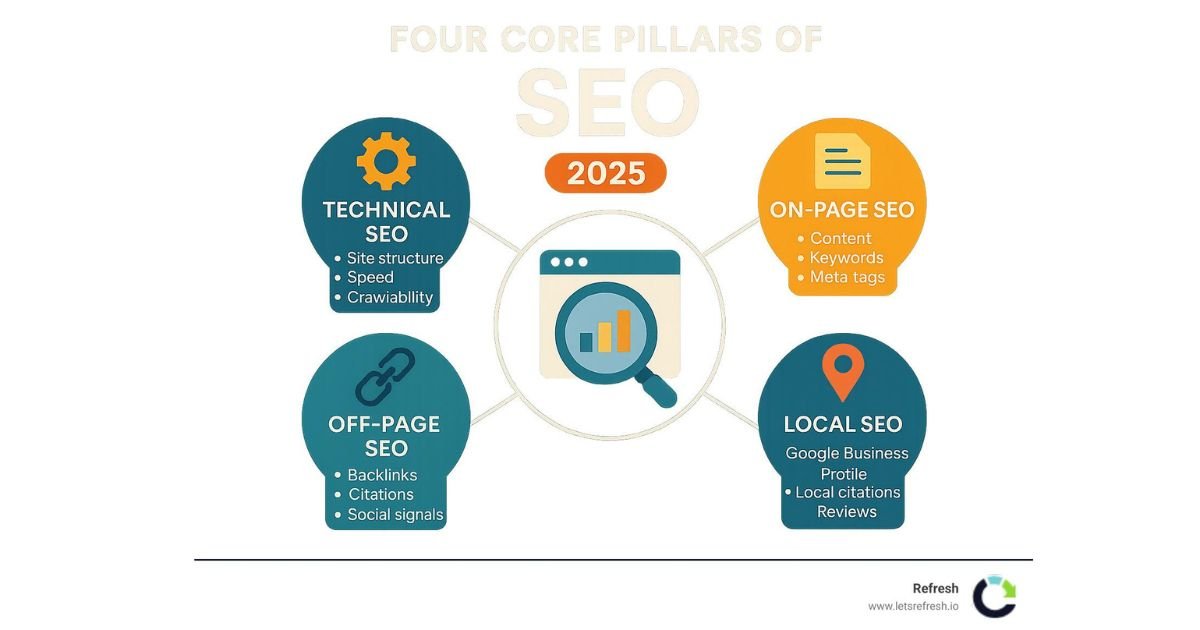
The four main categories are on-page SEO, off-page SEO, technical SEO, and local SEO. Knowing what they are enables you to determine which one you should look at first.
On-Page SEO
On-page SEO is about improving the content and elements on the individual pages of your site. The aim is to help the visitor understand what the page is about and to help the search engines work out what the page is about. You don't need any advanced coding skills to get started with many of the on-page improvements.
Start with your page title and your main heading. These should clearly explain what the page is about and what the visitor can expect to find. If you're writing an article on keyword research, then a title such as "Keyword Research for Beginners: A Practical Guide" will tell the reader far more than a generic title such as "How to Improve Your Website".
Your content should answer the main question upfront and then go on to provide the detail that the reader needs. Use descriptive subheadings, examples, relevant images, and internal links to related pages. Write in a natural way rather than just repeating your target keyword in every paragraph. Search engines can understand related language, so it's perfectly fine to explain things in the way that makes the most sense to your audience.
Image optimisation is also important. Where possible, give your images descriptive filenames and add relevant alternative text if the image contains useful information. The alt text will help screen reader users to understand the image and can also assist search engines in understanding what the image is. Don't just stuff it with irrelevant keywords.
Finally, use clear URLs and appropriate internal links. A URL like /keyword-research-guide says a lot more than a string of random characters. Internal links will link out to related pages and allow the visitor to navigate around your site without having to go back to the home page after every article.
Off-Page SEO
Off-page SEO is about activities that take place outside of your own site which can in turn help your site's reputation, visibility and authority. A well-known example of this is a backlink, which is when one site links to a page on your site.
Backlinks can help people find your content and give some context as to how websites link to one another. A link from a relevant and credible publication can be useful, particularly if it actually helps the reader to get to the content. That said, not all links are of equal value, and a high number of backlinks doesn't necessarily equate to a good ranking.
How can a novice actually get some worthwhile links? Do original research, write useful guides, share your expertise, contribute some useful commentary to the right publications, and get to know people in the industry. If you're providing something that actually solves a problem or gives people information they want to reference, then links will come naturally.
Don't buy spammy links, don't participate in link schemes (like link exchanges) that are designed to manipulate your search engine ranking, and don't use any automated methods to generate large numbers of backlinks. All of those are against the Google spam policy and can be a threat to your site's visibility. Google lays out the prohibited practices in its Search Essentials documentation.
Brand mentions and real business recognition can go a long way to getting people to know your site, even in the absence of a clickable link. It's all about building credibility rather than chasing some arbitrary backlink target.
Technical SEO
Technical SEO is all about making the site crawlable, indexable, and usable for both the visitor and the search engine. It's about crawling, indexing, site structure, mobile usability, security, redirects, and page performance.
Start by checking that your key pages are accessible and can be indexed. A page may simply not appear in the search results for a number of reasons: it could be blocked, it could have a directive in place which prevents it from being indexed, or it could be the victim of some other technical issue. There are tools in Google Search Console that allow you to inspect URLs and look at indexing information.
An XML sitemap can help search engines find the important URLs on your site (particularly useful on large sites or those with a complex structure). It's a list of URLs you're suggesting that the search engines should consider; it's not a command that will guarantee those URLs will be indexed. Your site's internal linking structure should also be such that it sensibly connects the important pages.
Mobile usability and mobile loading performance are both things that need to be looked at, as users expect pages to work on mobile devices. You need to check that the text is readable, that the buttons are easy to use, that the layout works on smaller screens, and that the key content loads appropriately. PageSpeed Insights from Google can be of great help in terms of assessing performance and spotting potential areas for improvement.
Security is another fundamental requirement. An HTTPS site secures the connection between the browser and the server. When you're changing URLs or doing a redesign, you need to use the correct redirects and check for broken links so that both your visitors and your search engines can get to the pages you intend.
Technical SEO can appear quite complex at first, but you don't have to go and fix everything on day one. You can start by looking at the issues that are stopping your important content from being found, indexed, and used.
Local SEO
Local SEO is about improving your visibility in searches that are location-based. It's very useful for shops, clinics, restaurants, service providers, training centres, and the like that are going to be serving people in a particular area.
For instance, a digital marketing training institute in Ghaziabad might wish to target people searching for SEO courses in Ghaziabad. They could create a very useful course page that details the syllabus, mode of teaching, fees, location, and the process of enrolment. They could also have a fully compliant Google Business Profile with correct contact details, opening hours, categories, etc.
Customer reviews can be a powerful tool in building trust and allowing prospective customers to compare businesses. It's important to get genuine customer feedback and to respond to reviews in a professional manner. Never buy reviews or pay people to leave positive ones.
Local content should be about the actual services and locations you're providing. Don't go out and create 30 or 40 pages of essentially identical content for nearby areas if they don't add any real value. Just explain the local services you provide, answer the local questions people will have, and give them some useful information to help them make up their minds.
Local SEO won't get you in the local results or on the map. Visibility is a function of relevance, distance, and prominence. Having accurate information and a good customer experience are the bedrock of local discoverability.
How to Start SEO for a New Website
Starting with SEO can be quite daunting when you see all those long technical checklists and complex analytics reports. The best way to get going is to concentrate on the basics, do them properly, and then see what the results are. You don't need to implement every single one of the more advanced techniques before you publish your very first useful page.
Start by defining your audience. Who is it that you're trying to serve? What problems do they need to solve, and what questions are they likely to type into a search engine? A site selling handmade furniture might be targeting people looking for storage solutions for small spaces, people wanting to know about the durability of the materials used, or people looking for advice on how to maintain their furniture. Those are the sorts of needs that will inform both your service pages and your blog content.
Next, do some keyword research and group them by topic and search intent. Pick a clear primary purpose for each of your key pages and then write original content to achieve that. Write a good descriptive title, structure the page with appropriate headings, add in some relevant internal links, and make it easy to navigate.
Use this beginner checklist to review your website:
· Know your audience and the questions they're going to be asking.
· Carry out research into the relevant keywords and search intent.
· Produce useful, original content.
· Write descriptive page titles and headings.
· Keep the URLs clear and the navigation simple.
· Link to relevant pages where appropriate to help the reader.
· Add appropriate alt text for the image.
· Check mobile usability, HTTPS, and page performance.
· Set up Google Search Console and submit a sitemap if appropriate.
· Review the performance data and continually improve the pages.
Once you've got the fundamentals in place, then don't go and overhaul everything at once. Keep an eye on which pages are getting indexed, which queries are generating impressions, and which pages are attracting the right kind of visitor. If a page is getting impressions but not clicks, then look at whether the title and description are in any way accurately reflecting the value of the page. If people are arriving at the page but not doing the thing you'd expect them to do, then you need to look at the relevance of the page, the clarity of the page, and the user experience.
For further guidance, see Google's Search Console getting started materials, which explain how site owners can monitor their search presence and investigate performance.
What Is Keyword Research?
Keyword research for the beginner is all about working out what people are actually searching for. It's about finding out the words and phrases that people use when they're looking for information, products, or services. It's a way of understanding your audience and working out which of those topics are worthy of having their own page. Good keyword research looks at the words as well as the intent behind the search.
Consider the two phrases "What is SEO" and "SEO services for small businesses". The first one would suggest that the person is looking to understand the concept. The second one may well be someone who is in the process of comparing providers or is in the market for an agency. They're both about SEO, but they represent very different requirements and wouldn't necessarily result in the same page.
Search intent is commonly grouped into three practical categories:
Search intent | What the searcher wants | Example |
Informational | To learn something or find an answer | What is search engine optimization? |
Commercial investigation | To compare options before making a decision | Best SEO tools for small businesses |
Transactional | To complete an action or purchase a service | Hire an SEO consultant |
These are useful categorisations rather than hard and fast rules. A search can have more than one intent, and the results that a search engine returns can go some way to telling you what people are looking for.
Start by writing down the questions that your customers or readers are going to ask. Then go and look at the autocomplete suggestions, the related searches, Google Trends, and the appropriate keyword tools. Have a look at the competitor pages to see what information they're providing and where you can offer a better explanation, better examples, or just more useful information.
Search volume can be used to gauge demand but should not be your sole criterion for selection. A very broad keyword may have a high search volume but will still bring in a lot of traffic from people who don't actually require your product. A more specific phrase may have lower search volume but will bring in a much more targeted audience.
The aim isn't to stuff as many keywords as you can onto a page. It's to pick a topic that's relevant to your audience and then produce the most useful answer you can realistically give.
Common SEO Mistakes Beginners Should Avoid
Beginners tend to spend too much time looking for the 'shortcuts' and not enough time actually working out what their audience needs. A proper, sustainable SEO strategy is all about good information, good site practice, and ongoing improvement. Avoiding a few of the common pitfalls will go a long way to helping you use your time more effectively.
Keyword stuffing is one thing to avoid. Simply repeating the same phrase over and over again won't get you better rankings and will make the article very hard to read. Use your main keyword where it fits, then go on to explain the subject in normal language.
Another issue is the wholesale copying of content from other sites. Publishing articles that are just a rehash of what someone else has written, or producing pages that are essentially just a rewording of competitor content with very little original value, gives you no reason for the reader to go to your site. You need to do your research, check the facts, explain the concepts in your own words, and include some relevant examples or insights.
Don't go in for the low-quality backlinks or the various schemes designed to game the search results. Don't go in for the approach of creating a massive number of thin pages just to target a number of small keyword variations. A smaller number of useful, well-structured pages is going to be far better for the reader than a huge number of thin articles.
Other common mistakes are to ignore the mobile visitor, to write a misleading title, to ignore broken links and to expect results straight away. The title should be accurate, and the content should be in line with what it promises in the SERP.
AI writing tools can help with the brainstorming, structuring, editing and organisation of research. The danger with publishing AI-written text without checking it for accuracy, originality, usefulness and relevance is that it can cause problems for the reader. You must check every claim, eliminate any repetition and, where possible, inject some of your own expertise. The finished piece must be able to answer the question.
Google's published guidance is all about helpful, reliable, and people-first content and makes it very clear that you should not be engaging in any practices which are designed to manipulate your search ranking.
Keep that principle right at the heart of your work: make the page useful for people first and then worry about the little optimisation details.
How long does SEO take to work?
SEO does not follow a fixed timetable. Some changes may be reflected in search results within days, while others may take several months or longer to produce meaningful results. Google explains in its SEO Starter Guide that changes can take different amounts of time to appear and recommends allowing time to assess their impact.
The timeline will of course vary depending on several factors. A new site will take time for the search engines to find its pages and get to know what it's about. A site that's been around for a while may have plenty of content and links already but will still be up against the competition. Technical issues, poor content, shifting search demand, and the quality of the competition all play a part.
Imagine you write a fairly detailed article on SEO for the complete beginner. Search engines will likely find it fairly quickly, but that doesn't mean it will suddenly be at the top of the results for a highly competitive search. Other sites may have more relevant content, a better reputation, or simply pages that are better at meeting the needs of the searcher. You may need to go back and improve the article, add some useful examples, strengthen the internal linking, and ensure any old information has been updated.
Use a range of metrics rather than rankings alone to track progress. Search impressions tell you how often your pages appear in the search results, clicks tell you how many visits those search results generate, and click-through rate is the ratio of impressions to clicks. Conversions (inquiries, purchases, etc.) tell you whether the traffic is actually achieving your business objectives.
Review your results regularly, but don't go in for any major changes based on a few days of data. Look for the patterns that actually mean something and only make changes that you can justify. SEO is really just a process of trial and error, of learning and improvement. It's not a get-rich-quick scheme.
Free SEO Tools for Beginners
You can start learning SEO without having to buy any expensive software. There are a number of free tools out there that will tell you things about your search visibility, your site traffic, keyword interest, and page performance. Each tool answers a different question, so you'll get the best results by using them in combination.
1. Google Search Console
Best for: Search visibility and indexing
Search Console allows you to monitor impressions, clicks, search queries, and indexing information for your site. It can be used to see which pages are appearing in the search results and to investigate any potential indexing problems.
2. Google Analytics
Best for: Website traffic and user activity
Google Analytics enables you to see how people get to your site and how they interact with the pages of your site. You can look at traffic sources, engagement, and your configured conversions to see whether your content is actually achieving your objectives.
3. Google Trends
Best for: Exploring topic interest
Google Trends enables you to compare search interest over time and across different locations. It can be used to investigate seasonal topics or to compare search interest in related terms (though the interest values are not actual search volume numbers).
4. Google Keyword Planner
Best for: Keyword ideas and advertising research
Keyword Planner provides keyword ideas and estimated search volume (mainly for the purpose of planning Google Ads campaigns). It can also be used to help you explore potential SEO topics, though the search volume estimates it provides should not be taken as indicative of actual organic traffic.
5. PageSpeed Insights
Best for: Page performance and user experience
PageSpeed Insights uses available field data and lab tests where possible to assess page performance. It can identify issues with loading speed, responsiveness and visual stability, which in turn will help you to determine which of the issues you should go on to investigate.
You don't need to be an expert on every tool. Start with Google Search Console to get a handle on how your site is performing in the search results, then move on to Analytics to see what's happening with your visitors. Add on the other tools as and when you need them to help you with your research or to help you troubleshoot a particular issue.
A Simple 30-Day SEO Action Plan
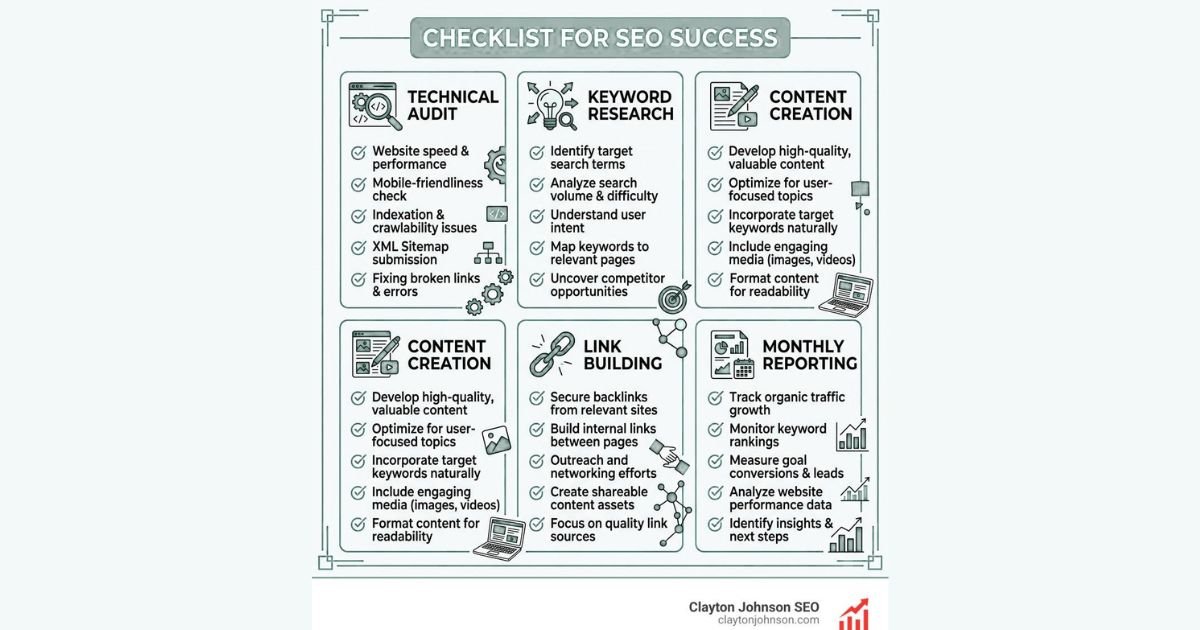
A 30-day plan gives you a realistic starting point. Rather than trying to do everything in the SEO arena at once, you simply break it down into weekly stages. That's the plan's purpose really; it's designed to help you build good habits and to spot where you can improve, not to guarantee you'll be ranking in a month.
Week 1: Research and audit
Understand your audience, list their key questions, go through your existing pages, and spot any glaring technical issues. Research the keywords that are relevant to your products, services, or content. Make sure you have Google Search Console set up if you haven't already.
Week 2: Improve existing pages
Review the key page titles, headings, URLs, and content. Make it absolutely clear what each page is for, add in the relevant internal links, improve the image alt text, and fix any broken links or other issues you come across.
Week 3: Publish and improve
Publish one or two genuinely useful articles as a result of your keyword research. Check that they look good on mobile, that the pages are accessible and that they're linked to relevant existing content.
Week 4: Measure and plan
Review the Search Console data, look at the indexing issues and identify the pages that are getting impressions but which could do with some work. Note what you've changed and then decide what you'll be working on next month.
By the end of the month you should have a much clearer picture of where your site is, who your audience is and what your next set of priorities should be. You probably won't be seeing a massive spike in traffic just yet (especially if you're a new site). That's absolutely normal. Just keep on churning out content, keep on monitoring, and keep on fixing things as you find them.
Final Thoughts
Understanding what SEO is is the first step in building a better online presence. SEO is all about helping people find the right information by improving the quality of your content, the structure of your website, the technical aspects of your site, and all the other things that impact your search visibility. It can be of benefit to bloggers, students, online retailers, service providers, and businesses of all sizes.
You don't need to be a technical expert overnight. Start by working out what your audience wants, research the relevant keywords, and then go ahead and produce clear, original content that answers their questions. Make sure your important pages are easily accessible to the search engines, provide appropriate internal linking, and check that your site is performing well on mobile. There are some free tools available (Google Search Console and PageSpeed Insights being the obvious ones) which will tell you where your efforts should be focused.
Most importantly, measure progress and keep improving. Search rankings can change, competitors can publish better content, and your audience's needs can evolve. A website that consistently provides relevant, reliable information has a stronger foundation for long-term organic visibility than one that depends on shortcuts.
If you are starting your SEO journey today, choose one important page and improve it first. Then apply what you learn to the rest of your website. What is your biggest SEO question as a beginner? Share it with the VartaSphere community and keep learning one step at a time.
Frequently Asked Questions About SEO
1. What is SEO in simple words?
SEO, or search engine optimization, is the process of improving a website so people can find its pages through unpaid search results. It includes creating helpful content, using relevant keywords, improving website structure, and making pages accessible to search engines. The goal is to attract visitors who are genuinely interested in your information, products, or services.
2. Can I learn SEO without coding?
Yes. You can learn many SEO fundamentals without writing code. Beginners can access keyword research, content creation, title optimization, internal linking, and Search Console analysis. Some technical SEO tasks may require a developer, especially for complex indexing issues, website migrations, or server configuration.
3. Is SEO free or paid?
Appearing in organic search results does not require paying Google for each click. However, SEO can involve costs for content creation, website development, tools, and professional services. You can begin with free tools and your own time, then invest in additional resources as your website grows.
4. Which SEO technique should beginners learn first?
Start with keyword research and search intent, then build helpful content and apply basic on-page SEO. Learn what your audience wants to know, create a page that answers their question, and give it a clear title and structure. Once these foundations are in place, check indexing, mobile usability, internal links, and performance.
5. Does publishing more blog posts improve SEO?
Publishing more articles does not automatically improve search rankings. Each article should serve a clear purpose, address a genuine audience need, and offer useful information. A smaller collection of comprehensive, relevant articles can be more valuable than hundreds of repetitive or low-quality posts. Review existing content and improve it when necessary instead of focusing only on publishing frequency.