
Just because you provide a good product or service doesn't mean that you've got what it takes to run a small business—you also have to help potential customers locate you, understand the nature of what you're offering, and feel confident about getting in touch with you. At present, a great many customers carry out online research on businesses before making a purchase, booking an appointment, or going to a local shop. They might search Google, compare out the business websites, read customer reviews, check out the social media profiles, or look for correct contact information on an online listing. If your business is hard to find online, then potential customers may go with a competitor whose details are easier to access.
The good point is that you need neither a big marketing budget nor an in-house marketing team if you want to build an online presence for your small business. All you have to do is set up a basic website, provide correct business details, produce useful content, and use one or two social media sites that are appropriate for your audience. The important thing is to concentrate on the activities which support your business objectives rather than attempting to carry out every task at the same time. The following guide will show you how to build an online presence step by step, how to enhance customer trust, how to improve your visibility, and how to measure your progress all without having to spend any unnecessary money.
What counts as an online presence?
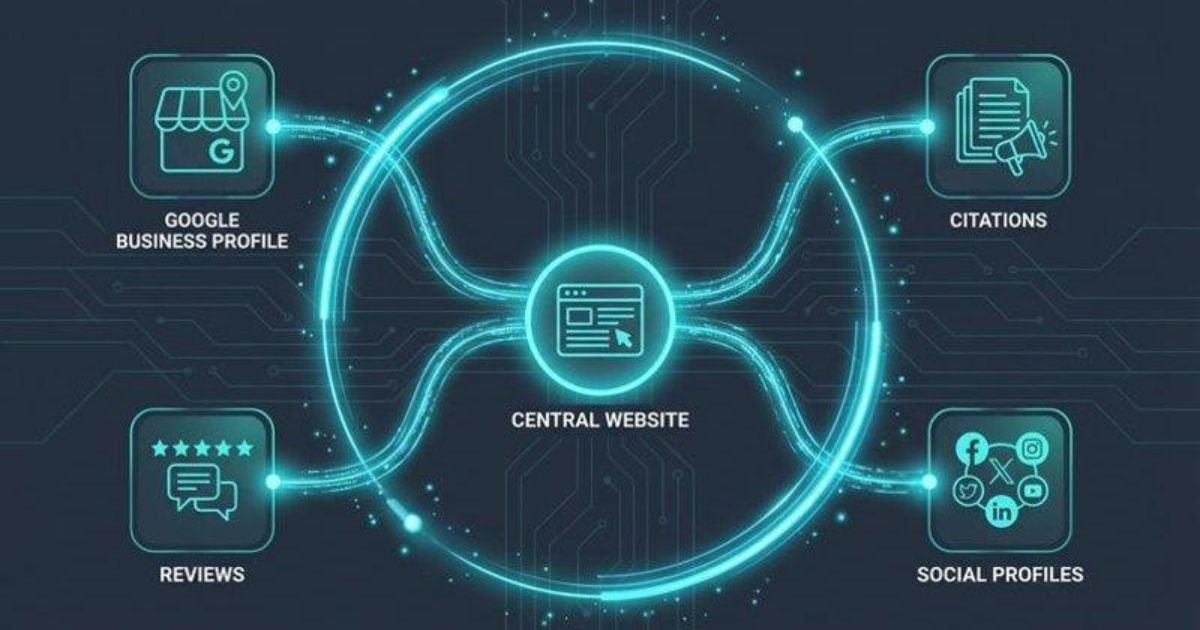
An online presence consists of the various digital locations where people can find out about your business, find out more about your products or services, get in contact with you, and assess your reputation. This comprises your website, your listings on search engines, your social media profiles, customer reviews, the entries you have in online directories, and the content that you produce. Each of these elements provides potential customers with a different means of becoming acquainted with your business; for instance, a person might come across a plumbing company by searching for it on Google, go to its website to see what services it offers, read the customer reviews and then call it to obtain a quotation.
A digital presence that is strong for a small business functions more like a connected system than as a set of separate accounts. The website sets out what you have to offer, search engine optimization enables people to find the relevant pages, and social media gives you the chance to communicate with your audience. Business listings make it easier to locate key details, while customer reviews supply information about the experiences of other people. Maintaining consistent branding, ensuring that the information is accurate, and providing useful content all help these different elements to work in unison. It is not necessary to set up all the channels at once; instead, start with the ones that your customers are most likely to use and then improve them over time.
Why Online Presence Matters for Small Businesses
A well-kept online presence enables small businesses to compete more effectively, even if they have small advertising budgets. For instance, a local bakery could put up its menu, share photos of its fresh products, list its opening hours, and respond to frequently asked questions on the internet. Similarly, a freelance accountant could explain the services they offer, describe their experience, and include a convenient inquiry form. Taking these simple steps helps potential customers to know what the business has to offer before they get in touch and also cuts down on the amount of effort needed to obtain the necessary information.
A website or social media presence can help to build brand credibility, facilitate communication with customers, generate leads, and encourage repeat business. It can enable you to contact people who are outside of your current network and draw in customers who are already looking for the products or services that you offer. Yet the possession of a website or a social media account does not in itself lead to sales; the outcomes will depend on various factors including demand, the level of competition, the quality of your service, your pricing, the customer experience, and the consistency of your marketing. You should view your online presence as a long-term business asset whose value increases as you carry on maintaining it and gain insights from customer behavior.
Step 1: Create a Professional Business Website
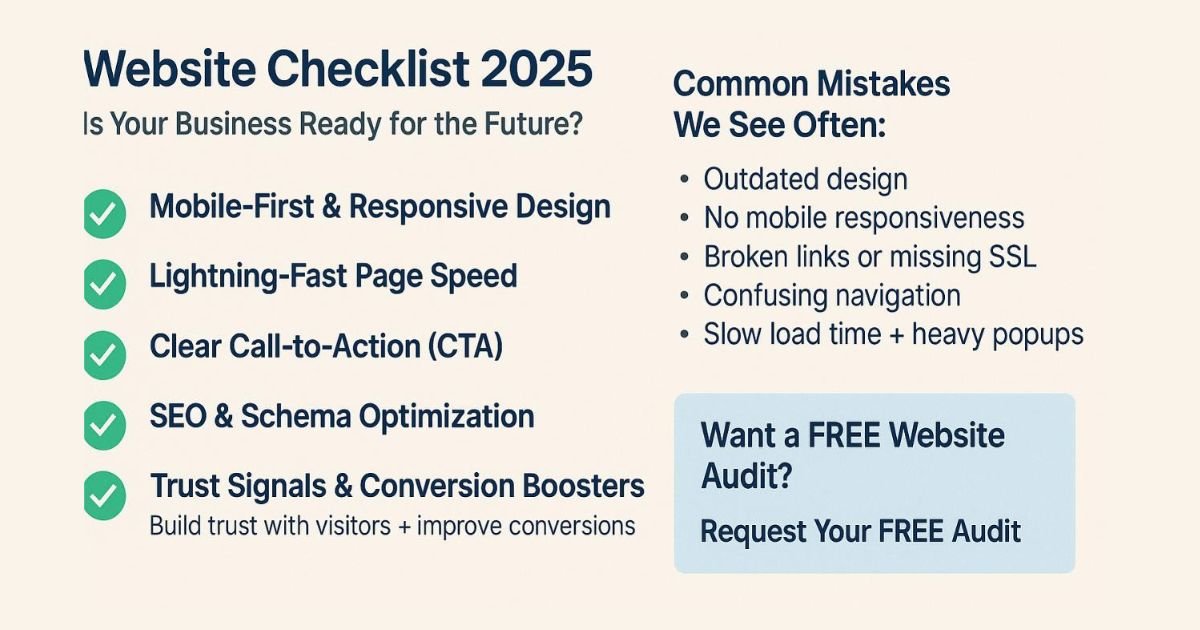
Your website is the main part of your online presence. Although social media sites and business directories can help people find you, a website gives you greater control over the way you present your business, explain your services, and lead visitors to take action. Begin by picking a domain name that is easy to remember, relevant to your business,, and simple to spell. Choose a website building platform that suits your technical abilities and financial situation; you might use a hosted website builder or a content management system like WordPress, according to your needs. You don't have to have an expensive design when you first start; what matters more than any unnecessary visual effects is a simple layout, readable text, and useful information.
Essential Website Pages and Features
A simple website for a small business should make it easy for people to understand your business and get in touch with you. It should have a homepage which clearly sets out the range of things you offer, an About Us page that gives an introduction to your business, and individual pages for each of your products or services that respond to customer queries. There should also be a Contact Us page containing correct contact details and a form for inquiries. Furthermore, a privacy policy might be needed, depending on the way in which your website collects and uses personal information.
You should focus on mobile usability, how fast the site loads, website security, and accessibility as well. People should be able to read your content, navigate the menu, and fill in forms easily when using a smartphone. Make sure to use HTTPS, compress large images, and check all the important buttons before going live with your website. Most important of all, each page should have a clear next step—for example, asking for a quotation, booking an appointment, or calling your business. A website ought to help customers make up their minds, not make them search for simple information.
Step 2: Improve Your Search Engine Visibility
Search engine optimization (SEO) enables search engines to get a better understanding of your website and helps potential customers locate pages that are relevant to their queries. Start by working out the kinds of questions people ask before they buy your products or hire your services. For example, a cleaning company could focus on searches involving home cleaning services, office cleaning prices, or move-out cleaning. Include these topics naturally in the titles of the relevant pages, in the headings, the descriptions, and the content of the website. It is important to publish original information that responds to actual questions rather than merely repeating keywords in order to affect the rankings.
You should also include logical internal links between pages that are related, use descriptive alt text for images where this is appropriate, and make sure that search engines have access to your key content. Google has a Search Engine Optimization (SEO) Starter Guide which offers practical advice for website owners.
Arrange Google Search Console so that you can review search impressions, clicks, search queries, and any possible indexing issues.
SEO requires a certain amount of time, and no technique can ensure that a website appears on the first page. You should concentrate on aiding users first, then look at the performance and make improvements to the pages on the basis of evidence.
Step 3: Set Up Your Business Listings
For someone who runs a local shop or offers services to people in certain areas, precise online business listings can make it easier for customers to find and get in touch with you. Eligible businesses are able to use a Google Business Profile to manage the information that appears in Google Search and Maps.
Make sure that the name of your business, your telephone number, your opening hours, the categories of services you provide, and your website information are all accurate. Include real photographs of your premises, of your team, of your products, or of completed work when it is appropriate to do so.
Prompt satisfied customers to leave genuine reviews and to respond to any feedback in a professional manner. When a problem is reported, acknowledge the concern and explain your plans to deal with it if suitable. Do not purchase reviews or set up fake customer accounts since such actions damage trust and could breach the platform's policies. Keep in mind that eligibility for a Google Business Profile is based on Google's guidelines and that businesses which only operate online usually do not meet the requirements. Make it a habit to check your listings from time to time, particularly whenever there is a change to your address, opening hours, or the services you offer.
Step 4: Choose the Right Social Media Platforms
It is not necessary to post content on all social media platforms if you want to establish a solid online presence; rather, you should select the platforms according to your audience, the type of business you have, and how much time you can spare. Instagram is appropriate for businesses that focus on visual content, for example, bakeries, fashion brands, salons, and interior designers. Facebook can help local businesses take part in community discussions and share news and updates. On LinkedIn, professional networking and business-to-business services can be carried out, and YouTube can be used to provide tutorials, demonstrations, and educational videos.
Begin with one or two appropriate platforms and keep them updated consistently. Post useful information, respond to relevant questions, explain your services, and provide real examples of your work. For example, a local electrician could publish advice on safety, explain typical household electrical problems, and show examples of finished projects with the customers' permission. Make sure to use the same business name, profile picture, and contact details on all your accounts. The objective of using social media for a small business should not be merely to gather followers; it should be to build relationships and help the correct audience understand the value you offer.
Step 5: Publish Useful Content Regularly
Content marketing enables your business to deal with customers' questions before they make a buying decision. You could produce blog posts, short videos, how-to articles, product demonstrations, frequently asked questions, and case studies. For example, a bakery could offer advice on storing cakes or explain how to order a custom birthday cake. A home repair business might create a guide on how to recognise common plumbing problems. A B2B consultancy could describe how companies can improve a specific process or prevent common mistakes.
When selecting topics, focus on real customer needs rather than publishing content just to meet a daily quota. Make sure your information is accurate, use examples when you can, and explain any complex ideas in simple English. An article that effectively answers one key question is more valuable than a number of repeated posts. You should also be able to take a single original idea and adapt it into different formats, for instance by turning a blog article into a short video or a series of social media posts. This method makes digital marketing for small businesses easier to manage without the need for a large content budget.
Step 6: Build Trust Through Reviews and Reputation
It is common for people to ask for reassurance prior to spending money with a business that they have never used before. Assurance of this kind can be given by means of genuine customer reviews, clear policies, accurate descriptions of the service, and professional communication. After a purchase or service has been completed, ask customers for honest feedback by sending them an appropriate follow-up message or providing them with a review link. It is important not to pressure customers into leaving positive ratings or to offer rewards in return for reviews where the platform rules forbid such incentives.
Handle both positive and negative feedback calmly and helpfully; thank customers for positive comments and address complaints without sharing any private information. If an error has been made, then explain the measures you are taking to correct it. Make sure that your website, business listings, and social media profiles are consistent so that customers do not see different information. Trust is built up through repeated experiences, and therefore your online reputation should match the same level of service quality and professionalism that customers receive when dealing with you in person.
Step 7: Use Email Marketing and Customer Communication
Small businesses can use email marketing to directly share useful updates with people who have agreed to receive them. This could involve sending out notifications about products, reminders regarding appointments, some helpful advice, seasonal promotions, or occasional newsletters. For example, a consultant might offer a business guide each month, while an online retailer could give its subscribers advice on how to look after their products. It's important to keep the content relevant and to avoid sending emails so often that they become annoying.
Make sure that your sign-up forms are clear, explain to subscribers what they can look forward to, and get their consent when it is necessary. Offer a working way to unsubscribe and comply with relevant privacy and marketing laws. You also need to respond quickly to genuine customer enquiries whenever they come in through email, website forms or social media; set realistic expectations regarding responses and ensure that someone is in charge of checking the messages that arrive. Keeping up consistent communication will help transform initial interest into a more solid customer relationship.
Step 8: Measure Results and Improve
For a digital strategy of a small business to be successful it is necessary to carry out regular reviews. First of all, decide on the aims you want to achieve with your online presence since your objective could be more qualified enquiries, online purchases, appointment bookings or visits to a physical location. After that, monitor the figures that are directly related to that aim rather than assessing success merely on the basis of the number of followers or website traffic.
Google Search Console enables you to find out how people locate your pages via Google Search, while Google Analytics can be used to analyse website traffic and visitor interactions provided that it has been properly set up. You should also look at enquiry submissions, telephone calls, relevant social media engagement and sales that have been completed together with these tools. Check the results over time, work out which pages or channels are contributing to your objectives and improve those areas that are not performing well. For instance, if a service page gets visits but few enquiries, you should clarify the offer, improve the call to action or make it easier to contact. Make your decisions on the basis of real results rather than assuming that every marketing activity is effective.
Common Online Presence Mistakes to Avoid
Small businesses may lose both time and money if they attempt to establish an online presence without first having a clear plan; an old website, inconsistent contact information, ignored reviews, and inadequate mobile usability all make a business look less trustworthy. Moreover, copying competitors' content or buying fake followers does not result in genuine customer relationships. It is also a common error to distribute one's limited resources over too many social media platforms and then leave a number of the accounts inactive.
Do not expect to see immediate results from SEO or from content marketing; search visibility and customer trust generally come about as a result of continuous effort and differ from one industry to another depending on the level of competition. You should regularly check your priorities, keep the channels that serve your audience, and get rid of any unnecessary complexity. It is often more practical to start with a smaller, well-managed digital presence than with a large number of incomplete profiles.
A Simple 30-Day Online Presence Action Plan
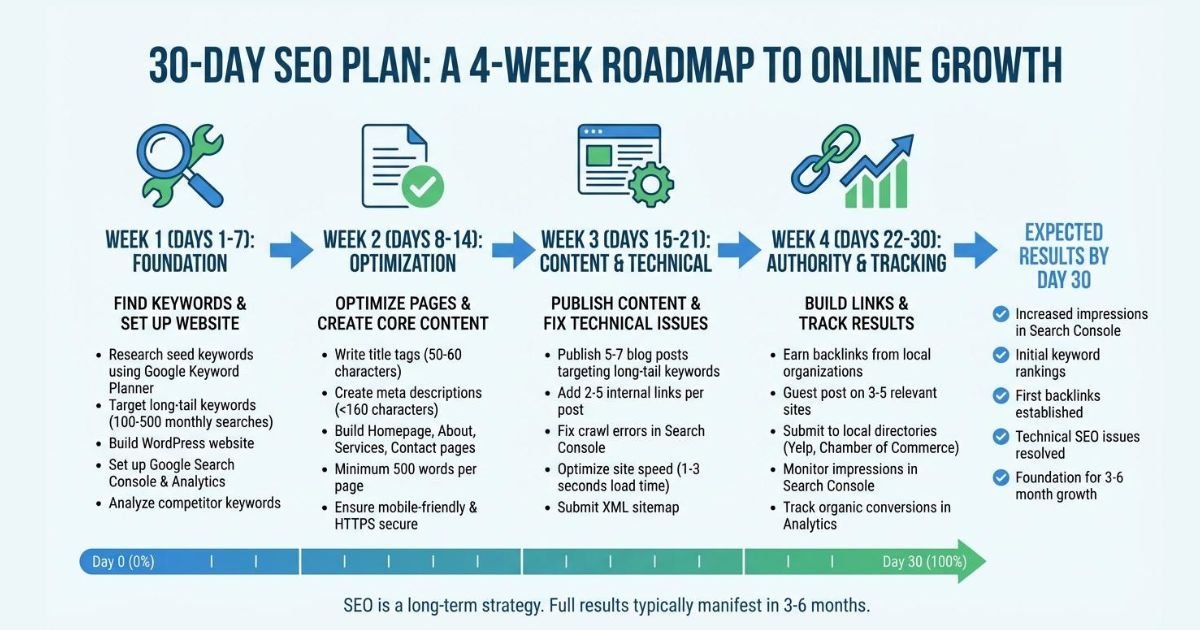
You can start to improve your online visibility during the next month without trying to carry out all the tasks at once; use the schedule listed below as an initial guide and then modify it to suit your business needs.
Period | Main focus | Actions |
Week 1 | Review and plan | Define business goals, check contact details, review branding, and assess your existing website and profiles. |
Week 2 | Improve foundations | Update essential website pages, fix obvious usability issues, review basic SEO, and check eligible business listings. |
Week 3 | Publish and connect | Choose suitable social media platforms, publish useful original content, and make it easier for customers to contact you. |
Week 4 | Build trust and measure | Request honest customer feedback, review performance metrics, and identify the next improvements. |
By the end of the month, make a list of the things you have completed and determine which tasks require more attention. It is possible that you won't notice any immediate rise in sales or search traffic, and that fact doesn't necessarily indicate that your efforts have been a failure. The aim of the first 30 days is to lay down solid foundations, set up a feasible routine, and start gathering useful performance data. Keep on improving your website, your content, and your communication with customers as your business increases.
Conclusion
To build a strong online presence for your small business, it is necessary to make sure that your business is easy to find, easy to understand, and easy to trust. Begin with a professional website, keep your search visibility accurate, keep your business listings accurate, and select social media platforms that are appropriate for your customers. Publish content that is truly useful, encourage honest reviews, communicate in a responsible manner, and assess your progress in relation to important business objectives.
It is not necessary to do all the tasks at one time or to spend a lot of money in order to make progress. By making steady improvements, providing accurate information, and focusing on your customers, you can gradually build a more solid digital foundation. Start with the changes that are most important to your audience and then proceed from there.
What does your small business find to be its greatest challenge in the field of online marketing at the moment, being picked up in search results, producing content regularly, or converting visitors into customers? Please share your experiences and the measures you are adopting to improve the situation.business,